Remove Subtitles for Video Translation Workflow
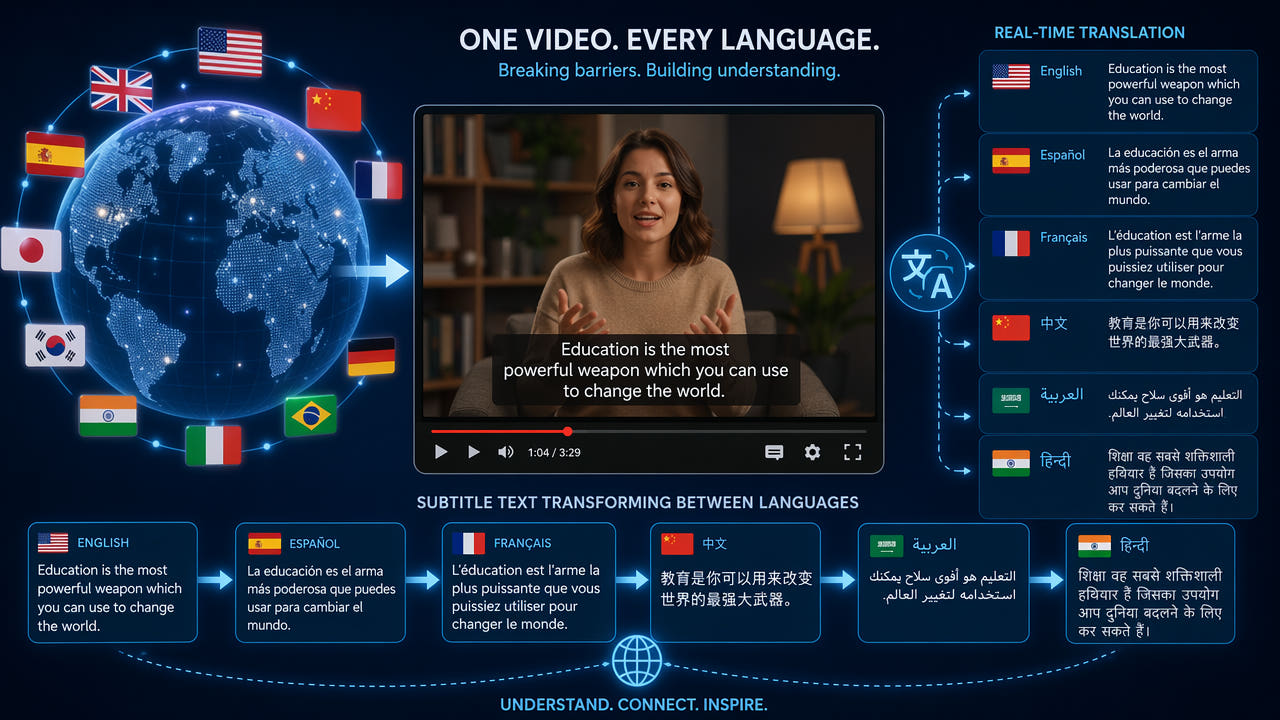
The Video Translation Challenge: Hardcoded Subtitles
Video localization is a growing industry as content creators and businesses expand into international markets. Whether you are translating corporate training videos, marketing content, educational courses, or entertainment media, one of the most common obstacles is dealing with hardcoded subtitles in the original language. These burned-in text overlays cannot be toggled off or replaced through standard subtitle editing tools because they are permanently rendered into the video pixels.
When a video has hardcoded subtitles in one language and you need to add subtitles in another language, you face a fundamental problem: the new translated text will overlap with the existing original text, making both unreadable. This is especially problematic when translating between languages with different character lengths, as translated text may be longer or shorter than the original, creating visual chaos in the subtitle area.
Hardcoded original subtitles must be removed before adding translations to prevent unreadable overlapping text in the subtitle area.
The professional solution is to first remove the original hardcoded subtitles using AI inpainting, creating a clean video canvas, and then add the new translated subtitles as a separate layer. This two-step workflow produces professional results where the translated subtitles appear clean and properly positioned without any trace of the original language text beneath them.
Common Scenarios Requiring Subtitle Removal for Translation
Several industries and content types frequently require this subtitle removal and replacement workflow. Understanding your specific scenario helps you choose the most efficient approach.
Anime and Asian Drama Localization
Japanese anime, Korean dramas, and Chinese web series often ship with hardcoded subtitles in their original language or in a fan-translated language. Professional localization teams need to remove these existing subtitles before adding officially translated versions for new markets. The volume of content in this category makes efficient batch processing essential for meeting production deadlines.
Corporate Training Video Translation
Multinational companies frequently need to translate training videos created in one language for employees in other regions. These videos often have hardcoded subtitles added during initial production that need removal before the localization team can add translated versions. The professional appearance of training materials directly impacts employee engagement and learning outcomes.
Social Media Content Localization
Brands expanding internationally often need to translate their social media video content. TikTok videos with auto-captions in English need those captions removed before adding Spanish, French, or other language versions for regional accounts. This workflow is increasingly common as brands adopt multi-market social media strategies with localized content for each region.
Video translation workflows span anime localization, corporate training, and social media content for international market expansion.
Documentary and Film Subtitling
Independent filmmakers and documentary producers who distribute internationally often need to replace subtitle tracks for different markets. When the original distribution version has hardcoded subtitles, these must be removed before creating new language versions. This is particularly common with festival submissions where different markets require different subtitle languages.
Step-by-Step: Remove Subtitles for Translation
Follow this professional workflow to remove original language subtitles and prepare your video for translated subtitle addition.
Step 1: Assess the Subtitle Type
Before processing, determine whether your video has hardcoded (burned-in) subtitles or soft subtitles. Open the video in a media player like VLC and check the subtitle menu. If you can toggle subtitles on and off, they are soft subtitles stored as separate tracks and do not require AI removal. Simply disable the track and add your translation. If the subtitles cannot be toggled off, they are hardcoded and require the AI removal workflow described below.
Step 2: Upload to AI Subtitle Remover
Navigate to 550W Video Eraser and upload your video file. For longer videos like full episodes or training modules, split the content into segments of 3 minutes or less for processing. Keep track of segment order and timestamps to reassemble the video correctly after processing. The tool accepts MP4 and MOV formats up to 300MB per upload.
Step 3: Select the Subtitle Region
Identify where the original subtitles appear on screen. Most professional subtitles are positioned in the lower 15 to 20 percent of the frame. Draw your selection rectangle to cover the entire subtitle area including any background styling or shadow effects. For videos where subtitles appear in multiple positions, such as speaker identification at the top and dialogue at the bottom, you may need multiple processing passes with different selection regions.
Step 4: Process and Verify Each Segment
Run the AI inpainting process on each video segment. After processing, carefully review the output to ensure all subtitle text has been completely removed. Pay special attention to frames where subtitles transition in or out, as partial text may remain during these moments. If any traces remain, reprocess the specific segment with a slightly larger selection area.
Step 5: Reassemble and Add Translated Subtitles
If you split the video into segments, reassemble them in your video editor maintaining the original timing. Then import the clean video into your subtitle editing software such as Subtitle Edit, Aegisub, or professional tools like Telestream Vantage. Add your translated subtitle track with proper timing synchronized to the audio. Export the final video with the new language subtitles rendered in your preferred style and position.
Best Practices for Translation-Ready Subtitle Removal
Professional localization teams follow these practices to ensure the highest quality results when removing subtitles for translation purposes.
Preserve Timing Information
Before removing the original subtitles, extract their timing information if possible. Even though the text is in the wrong language, the timing data tells you exactly when each subtitle appears and disappears. This timing information is invaluable for synchronizing your translated subtitles, especially for content where lip-sync accuracy matters. Use OCR tools to extract text and timing from the hardcoded subtitles before removal.
Process at Maximum Quality
For professional localization work, always process at the highest available quality. Use the original source file rather than a compressed or re-encoded version. Each generation of compression introduces artifacts that make AI inpainting less effective. If you only have access to a compressed version, process it once and avoid re-encoding the output multiple times before adding translated subtitles.
Handle Multiple Subtitle Styles
Some videos contain multiple types of text overlays: dialogue subtitles, speaker names, location identifiers, and on-screen graphics with text. Determine which elements need removal for translation and which should remain. Location names and speaker identifications may need translation too, or they may be universal enough to keep. Plan your removal strategy before processing to avoid unnecessary work.
Consider Subtitle Positioning for Target Language
Different languages have different space requirements. German text is typically 30 percent longer than English. Arabic and Hebrew read right-to-left. Chinese and Japanese can be written vertically. When removing original subtitles, ensure your selection area is large enough that the clean region can accommodate the translated text in your target language, which may require more vertical or horizontal space than the original.
Scaling Subtitle Removal for Large Projects
Localization projects often involve large volumes of content. Here are strategies for handling subtitle removal efficiently at scale.
Batch Processing Workflows
For series with consistent subtitle positioning across episodes, establish your selection parameters once and apply them to all episodes in batch. Tools that support batch processing allow you to queue multiple video files with the same selection region, processing them sequentially without manual intervention for each clip. This is essential for anime series, training video libraries, and multi-episode content.
Template-Based Approaches
Create processing templates for different content types in your workflow. A template for standard dialogue subtitles at the bottom of the frame, another for top-positioned speaker labels, and another for full-screen text cards. Applying the appropriate template to each video segment speeds up the selection process and ensures consistency across your project.
Quality Control Pipeline
Implement a quality control step between subtitle removal and translation addition. Have a team member review processed videos at 2x speed to catch any remaining text artifacts, color inconsistencies, or temporal glitches. Catching issues at this stage is far more efficient than discovering them after translated subtitles have been added and the video has been exported for delivery.
For more information on batch processing capabilities, see our article on removing hardcoded subtitles from any video, which covers advanced processing techniques applicable to translation workflows.
Tools for the Complete Translation Workflow
A professional video translation workflow combines several specialized tools for different stages of the process.
Subtitle Removal: AI Inpainting Tools
Cloud-based AI tools like 550W Video Eraser handle the removal phase. They process videos quickly, maintain quality, and support the batch workflows needed for large localization projects. The AI approach is language-agnostic, working equally well on subtitles in any writing system including Latin, CJK, Arabic, Cyrillic, and Devanagari scripts.
Translation: CAT Tools and Human Translators
For the actual translation work, professional teams use Computer-Assisted Translation tools like SDL Trados, memoQ, or Memsource combined with human translators. Machine translation from services like DeepL or Google Translate can provide first drafts that human translators then refine for accuracy, cultural appropriateness, and natural flow in the target language.
Subtitle Creation: Dedicated Subtitle Editors
After translation, subtitle editors like Aegisub, Subtitle Edit, or professional platforms like Ooona and ZOOsubs handle timing, formatting, and rendering of the new subtitle track. These tools offer precise frame-level timing control, style customization, and export in multiple subtitle formats including SRT, ASS, and burned-in rendering.
Quality Assurance: Review and Testing
Final QA involves reviewing the translated video with subtitles in context. Check for timing accuracy, text overflow, readability against different backgrounds, and cultural appropriateness. Professional localization teams often use native speakers of the target language for final review to catch nuances that automated tools might miss. For quality-focused subtitle work, our guide on removing subtitles without quality loss provides additional technical guidance.
Frequently Asked Questions
Why do I need to remove subtitles before translating a video?
Hardcoded original subtitles overlap with new translated text, making both unreadable. Removing originals first creates a clean canvas for proper translation placement.
Can I add new subtitles in a different position instead?
Placing translated subtitles in a different position is possible but looks unprofessional. Removing originals allows proper placement in the standard subtitle area.
What languages of hardcoded subtitles can AI remove?
AI inpainting removes subtitles regardless of language. It treats text as pixels to replace, working equally well on English, Chinese, Japanese, Korean, and Arabic text.
How do localization teams handle subtitle removal at scale?
Professional teams use batch processing tools to remove subtitles from multiple episodes simultaneously, then add translated tracks via dedicated subtitle editing software.