Content Repurposing Tools Every Video Creator Needs
Why Content Repurposing Is Essential for Video Creators
Creating high-quality video content takes significant time and effort. Filming, editing, color grading, and adding effects for a single video can consume an entire day. Yet publishing that video on just one platform means you reach only a fraction of your potential audience. Content repurposing solves this problem by transforming a single piece of content into multiple platform-optimized versions, maximizing the return on every hour you invest in production.
The modern creator economy demands presence across multiple platforms simultaneously. Your audience on TikTok differs from your YouTube subscribers, who differ from your Instagram followers. Each platform has unique format requirements, audience expectations, and algorithmic preferences. Content repurposing tools bridge these gaps by automating the technical transformations needed to adapt content for each destination.
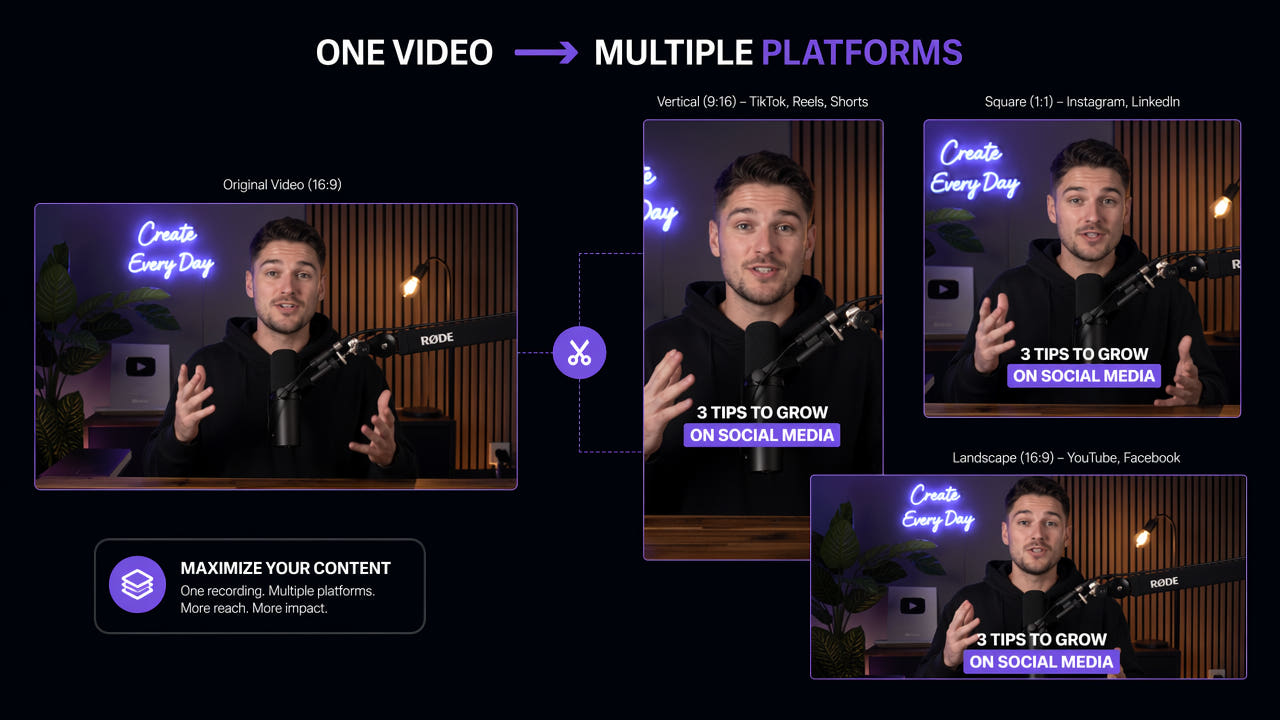
Content repurposing multiplies your reach by transforming one video into platform-optimized versions for every audience.
Professional creators and agencies have long understood that repurposing is the key to sustainable content production at scale. Rather than creating entirely new content for each platform, they build systems that efficiently transform source material into multiple outputs. The right tools make this workflow accessible to independent creators as well, enabling solo operators to maintain a multi-platform presence without burning out.
Essential Content Repurposing Tools for 2025
The content repurposing toolkit has evolved significantly with AI-powered solutions that automate previously tedious manual tasks. Here are the categories of tools every video creator needs in their workflow.
AI Subtitle and Watermark Removal
The first step in repurposing platform-specific content is removing elements that identify the original platform. TikTok watermarks, Instagram caption overlays, and platform-specific UI elements all need to be stripped before content can be reposted elsewhere. The 550W Video Eraser uses AI inpainting technology to cleanly remove these elements while preserving the underlying video quality. Unlike simple cropping or blurring approaches, AI inpainting reconstructs the background behind removed elements, producing professional results suitable for any platform.
Subtitle removal is equally critical for repurposing. Videos with burned-in captions in one language cannot be effectively repurposed for audiences speaking different languages. Removing the original subtitles creates a clean base that can be recaptioned appropriately for each target audience and platform. This is particularly important for creators expanding into international markets where the original language captions would be irrelevant or distracting.
Video Resizing and Reformatting Tools
Different platforms require different aspect ratios and video dimensions. YouTube uses 16:9 landscape, TikTok and Reels use 9:16 vertical, and feed posts often work best at 1:1 square. Resizing tools with AI-powered smart cropping automatically identify the most important elements in each frame and adjust the crop accordingly, ensuring subjects remain centered and key visual information is preserved regardless of the output format.
Clip Extraction and Highlight Tools
Long-form content can be broken into multiple short-form clips for platforms like TikTok and YouTube Shorts. AI-powered clip extraction tools analyze your video for engaging moments, natural break points, and high-energy segments, then automatically generate short clips with appropriate start and end points. This transforms a single 20-minute YouTube video into five or more short-form pieces without manual scrubbing and cutting.
Caption and Subtitle Generation
After removing original platform-specific captions, you need to add new ones optimized for each destination. AI caption generators produce accurate transcriptions and can style captions to match platform trends, whether that means animated word-by-word highlighting for TikTok or clean lower-third subtitles for YouTube. Multi-language caption generation further extends your reach to international audiences.
AI-powered tools automate subtitle removal, resizing, clipping, and recaptioning to streamline cross-platform repurposing.
Step-by-Step Content Repurposing Workflow
An efficient repurposing workflow follows a systematic process that minimizes manual effort while maximizing output quality across all target platforms.
Step 1: Audit Your Source Video
Begin by reviewing your original video and identifying segments that can stand alone as shorter clips for different platforms. Note timestamps of key moments, quotable statements, visual highlights, and natural break points. A 10-minute YouTube video typically contains three to five segments suitable for short-form repurposing. Document these segments before beginning any technical processing to ensure you extract maximum value from the source material.
Step 2: Remove Platform-Specific Elements
Use an AI subtitle and watermark remover like 550W Video Eraser to strip any platform-specific overlays from your source footage. This includes TikTok watermarks, Instagram caption burns, channel logos you want to replace, and any text overlays that are specific to the original posting context. Process the full video first to create a clean master file, then extract clips from this cleaned version. For detailed guidance on watermark removal, see our guide on removing TikTok watermarks for repurposing.
Step 3: Resize and Reformat
With your clean master file ready, create versions in each required aspect ratio. Use smart cropping tools that track subjects and maintain visual composition across different frame sizes. Export separate files for each platform: 9:16 vertical for TikTok, Reels, and Shorts; 16:9 landscape for YouTube and LinkedIn; and 1:1 square for Instagram feed posts and Twitter. Batch processing tools can handle all these conversions simultaneously.
Step 4: Add Platform-Specific Overlays
Each platform version needs its own optimized overlays. Add trending caption styles for TikTok, clean subtitles for YouTube, and eye-catching text hooks for Reels. Include platform-appropriate calls to action, branding elements, and end screens. This customization ensures each version feels native to its platform rather than obviously repurposed, which improves engagement and algorithmic performance.
Step 5: Schedule and Publish
Use a content scheduling tool to distribute your repurposed content across all platforms at optimal posting times. Stagger releases to avoid audience fatigue if followers overlap across platforms. Track performance metrics for each platform version to identify which formats and segments resonate best, informing future repurposing decisions and content creation priorities.
Comparing Top Repurposing Tools
Not all repurposing tools are created equal. Here is how the leading options compare across key criteria that matter for video creators.
550W Video Eraser — Best for Clean Source Preparation
550W Video Eraser excels at the critical first step of repurposing: creating a clean source file free of watermarks, subtitles, and platform overlays. Its AI inpainting technology produces superior results compared to blurring or cropping approaches. The batch processing capability handles multiple videos efficiently, making it ideal for creators who repurpose content regularly. Available as both a web tool for quick single-video processing and a desktop application for high-volume workflows.
Opus Clip — Best for AI Clip Extraction
Opus Clip uses AI to analyze long-form videos and automatically extract the most engaging short-form clips. It identifies viral-worthy moments based on engagement patterns and generates clips with appropriate hooks and endings. Best suited for creators who produce long-form content on YouTube and want to automatically generate short-form derivatives without manual editing.
Repurpose.io — Best for Automated Distribution
Repurpose.io focuses on the distribution side of repurposing, automatically reformatting and publishing content across multiple platforms when you post to one. It handles basic resizing and reformatting but lacks advanced features like AI watermark removal. Best for creators who want hands-off distribution automation and are less concerned about platform-specific optimization.
Canva Video — Best for Visual Customization
Canva Video provides templates and design tools for adding platform-specific visual elements to repurposed content. Its strength lies in creating branded overlays, thumbnails, and text animations rather than technical video processing. Best used in combination with other tools that handle the technical preparation steps like subtitle removal and resizing.
Advanced Repurposing Strategies
Beyond basic reformatting, advanced repurposing strategies extract even more value from your content investments.
Content Atomization
Content atomization breaks a single piece of content into its smallest useful components. A 30-minute interview becomes: five short-form video clips, ten quote graphics, three blog post summaries, one email newsletter, and multiple social media text posts. Each atom serves a different audience segment and platform, multiplying your content output by ten or more from a single recording session.
Platform-Native Adaptation
True repurposing goes beyond reformatting to create content that feels native to each platform. This means adjusting pacing for TikTok's fast-scroll environment, adding chapter markers for YouTube's longer attention spans, and creating carousel-style breakdowns for Instagram. AI tools handle the technical transformations while you focus on strategic adaptation decisions that require human creative judgment.
Evergreen Content Recycling
High-performing evergreen content can be repurposed repeatedly with minor updates. Remove dated elements like year references or platform-specific trends, refresh the visual presentation, and republish to reach new audience members who missed the original. AI subtitle removal tools make it easy to strip outdated captions and replace them with current messaging without re-recording the video.
Multi-Language Expansion
Repurposing content into multiple languages dramatically expands your addressable audience. The workflow involves removing original-language subtitles with AI tools, generating translated captions or voiceovers, and publishing language-specific versions on regional platforms. For creators with international audiences, this strategy can multiply viewership without creating new source content. Learn more about this workflow in our guide on removing subtitles for video translation.
Measuring Repurposing ROI
Tracking the return on investment from content repurposing helps justify the time and tool costs involved in maintaining a multi-platform presence.
Time Investment Metrics
Measure the time spent creating original content versus the time spent repurposing it. An efficient repurposing workflow should take no more than 20-30 percent of the original creation time while producing three to five additional content pieces. If repurposing takes longer than this, evaluate your tool stack for automation opportunities. AI-powered tools like batch subtitle removal can reduce processing time from hours to minutes.
Reach Multiplication
Track total impressions and reach across all platforms compared to single-platform publishing. Effective repurposing typically multiplies total reach by three to five times with minimal additional effort. Monitor which platforms contribute the most incremental reach to prioritize your repurposing efforts where they generate the greatest audience expansion.
Engagement Quality
Not all repurposed content performs equally. Track engagement rates (likes, comments, shares, saves) for repurposed content versus platform-native content. Well-repurposed content should achieve at least 70 percent of the engagement rate of native content. If engagement is significantly lower, invest more time in platform-specific adaptation rather than simple reformatting.
Frequently Asked Questions
What are content repurposing tools?
Content repurposing tools help creators transform existing videos into new formats for different platforms, including subtitle removal, resizing, clipping, and reformatting.
How many platforms can I repurpose one video for?
A single video can be repurposed for five or more platforms including YouTube, TikTok, Instagram Reels, LinkedIn, and Twitter with different formats.
Do I need to remove watermarks before repurposing?
Yes. Platform watermarks like TikTok logos reduce reach on other platforms. AI tools like 550W Video Eraser remove them cleanly before reposting.
Can AI tools batch-process repurposed content?
Yes. Tools like 550W Video Eraser support batch processing, letting creators clean multiple videos simultaneously for efficient distribution.